
Columnar Storage: Why Column Stores Beat Row Stores for Analytics
Columnar storage reads only needed columns, skipping the rest. Dictionary encoding shrinks data 50–100×. Analytics queries go from minutes to milliseconds.
On this page
You have a table of 100,000 users: name, age, country. Your dashboard needs the average age. A row store reads all 100,000 names, ages, and countries off disk—three columns you don’t need—just to sum one. A columnar store reads only the age column: 100 kilobytes instead of 45 megabytes. The difference between that query completing in three minutes versus thirty milliseconds is not optimization; it’s storage design.
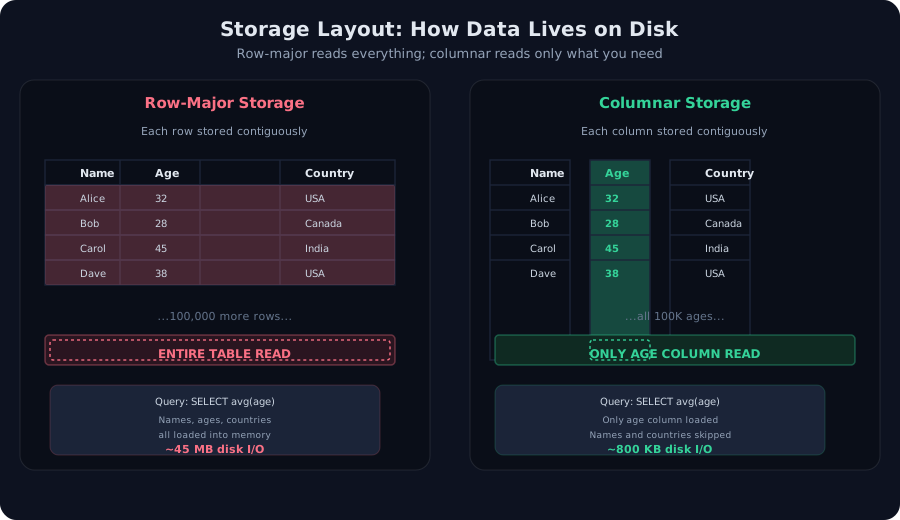 Two ways to store the same table: row-major reads everything; columnar reads only what you need.
The Naive Way: Row Storage
Row stores organize data as they arrive. Alice’s record—name, age, country—sits contiguously on disk. Bob’s record comes next. This layout is natural for OLTP databases (point lookups, single-row inserts, updates). Fetch one row by ID, and all its columns are already adjacent—one disk seek, fast.
But analytics flip the problem. A query like SELECT avg(age) FROM users doesn’t care about names or countries. In a row store, the database still reads them. The optimizer can’t skip columns; they’re physically interleaved. Worse, if the table spans millions of rows across many disk blocks, the cost is brutal:
- 100,000 rows × 3 columns per row = 300,000 column values
- Names (20 bytes) + ages (2 bytes) + countries (10 bytes) = 32 bytes per row
- 100,000 rows × 32 bytes = 3.2 million bytes read from disk for one integer average
On a typical SSD with 500 MB/s throughput, that’s 6 milliseconds. On a spinning disk, seek latencies dominate—easily 100+ milliseconds for scattered I/O. For a billion-row table, row storage can take 10+ minutes just for I/O.
The Breakthrough: Columnar Layout
Flip the storage model. Instead of row-by-row, store all ages together, all names together, all countries together:
Names:     [Alice, Bob, Carol, Dave, ...]         (2M bytes)
Ages:      [32, 28, 45, 38, ...]                  (400K bytes)
Countries: [USA, Canada, India, USA, ...]         (1M bytes)
Now SELECT avg(age) reads only the ages column—400 kilobytes off disk. At 500 MB/s, that’s under 1 millisecond. The breakthrough is not clever algebra; it’s alignment: the disk layout matches the query shape.
Real-world analytics queries are even more aligned:
- Aggregations (
SELECT sum, avg, max) read one or two columns - Filtering (
WHERE age > 30) scans one column, checks a range, and skips unrelated data - Joins on a range (all users in India) scan the country column once and use the bitmap to fetch matching rows later
How Columnar Storage Works: Mechanism
Layout on Disk
A columnar file (Parquet is the standard) looks like this:
[Metadata: schema, compression codec, statistics]
[Column 1: Names, compressed]
[Column 1: Dictionary/encoding info]
[Column 2: Ages, compressed]
[Column 2: Encoding metadata]
[Column 3: Countries, compressed]
[Column 3: Encoding metadata]
[Footer: offsets, checksums]
When the query engine reads the file, it scans the metadata, jumps to the age column’s offset, and decompresses only that column. Names and countries are never touched.
Compression: Dictionary Encoding
Columnar storage compresses aggressively because columns are homogeneous. A country column has thousands of rows but maybe 200 distinct values. A row store can’t exploit this pattern; a columnar store does.
Dictionary encoding works like a lookup table:
- Build a dictionary:
{0: "USA", 1: "Canada", 2: "India", 3: "Mexico", ...} - Replace values: Store
[0, 0, 1, 2, 0, ...]instead of["USA", "USA", "Canada", "India", "USA", ...] - Compress codes: If there are 256 distinct values, each code fits in one byte. If 4 distinct values, two bits per code suffice.
For a 100,000-row country column:
- Uncompressed: 100K rows × 10 bytes/string = 1 MB
- Dictionary + byte codes: 256 × 10 bytes (dictionary) + 100K × 1 byte (codes) = ~100 KB
- Dictionary + 2-bit codes: 256 × 10 bytes + (100K × 2 bits) = ~27 KB
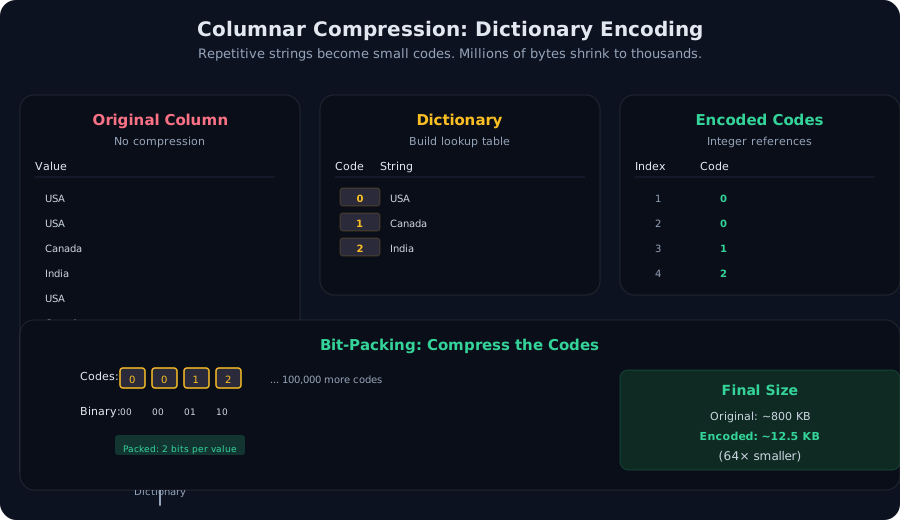 Dictionary encoding: store a lookup table once, then reference it with tiny codes. Bit-packing fits multiple codes into a single byte.
Vectorized Execution
Modern CPUs process data in vectors—SIMD instructions operate on 4, 8, or even 64 values simultaneously. Columnar data, stored contiguously in memory, is perfectly aligned for vectorization.
// Row store: scattered data, can't vectorize efficiently
for(int i = 0; i < 1M; i++)
  total += rows[i].age;  // random memory access, no SIMD

// Columnar store: dense array, vectorized instantly
for(int i = 0; i < 1M; i += 8)
  total_vec += ages[i..i+7];  // 8 values per CPU cycle
DuckDB and Polars both compile analytical queries to vectorized code, achieving 5–10× speedups over scalar execution just from CPU alignment.
Aggressive compression (dictionary, run-length encoding, delta encoding) uses CPU to decompress. A query touching 10% of a massive compressed column might spend 30% of its time decompressing. For columnar databases, this is a win—decompression is parallelizable and fast compared to disk I/O, which is sequential and slow. But in memory-resident workloads or with already-uncompressed parquet files, compression overhead can matter.
The Trade-off: When Row Stores Win
Columnar storage is not a universal replacement. OLTP (Online Transaction Processing) workloads suffer:
- Point lookups: Fetch one user by ID. A row store reads one row from disk (usually in one seek). A columnar store must reassemble the row from multiple column chunks, seeking and decompressing each. Columnar is slower.
- Writes: Updating Alice’s age in a columnar store requires rewriting the age column (or at least the chunk containing Alice’s row). Row stores append a new record or update in place. Columnar stores typically assume immutable batch loads.
- Mixed workloads: If queries alternate between reading a full row and analyzing a single column, the columnar layout saves time on analytics but costs extra time on row reconstruction.
This is why operational databases (Postgres, MySQL, MongoDB) remain row-oriented. Financial transactions, user-facing updates, and real-time point queries all expect instant single-row access. Analytics move to columnar databases once data is loaded into a data warehouse: Parquet files in S3, DuckDB on a laptop, Snowflake, BigQuery, or Redshift in the cloud.
In Practice: When to Reach for Columnar
Use a columnar database when:
- Queries touch few columns: Your dashboard runs
SELECT sum(revenue), count(*) FROM sales WHERE region = 'APAC'. The dates, customer names, and product details are never read. Columnar saves 80% of I/O. - Data is loaded in batches: Append-only logs, hourly snapshots, daily backups. Columnar databases excel at immutable, bulk-loaded data.
- You analyze billions of rows: A billion-row table in a row store is too large for most queries to complete in seconds. Parquet + DuckDB on a laptop handles it.
- Compression matters: Repetitive data (product categories, country codes, status flags) compresses 50–100× in columnar format. Storage and I/O costs plummet.
Avoid columnar when:
- You need instant single-row updates: A columnar database is built for append, not in-place update.
- Queries always fetch entire rows: If every query reads name, age, and country together, row storage’s adjacency is a win.
- Data is highly dynamic: Write-heavy workloads (like message queues or real-time user activity) need fast random writes. Row stores handle this; columnar stores don’t.
Takeaway
Columnar storage is not a magical compression technique or a new data structure—it’s a conscious decision to align physical layout with analytical query patterns. By storing each column contiguously, columnar databases let aggregations, filters, and statistics queries read only the bytes they need, shrinking query time from minutes to milliseconds. Dictionary encoding and bit-packing compress repetitive columns 50–100×, turning multi-gigabyte tables into kilobytes. For analytics, this is a fundamental unlock. For transactions, it’s the wrong tool. Choose the right layout for your workload.
Frequently asked questions
Why does reading a single column in a row store require reading the whole table?
Row storage interleaves columns: each row stores name, age, country sequentially. To average ages, the database must scan every record linearly, fetching names and countries along the way, even though only ages are needed. Columnar storage stores all ages contiguously, so a query seeking only ages can skip unrelated columns entirely.
What is dictionary encoding and how much does it compress?
Dictionary encoding replaces repetitive string values with small integer codes. If a country column has 100,000 rows but only 50 distinct countries, each row stores a code (1–2 bytes) instead of the full string (8–20 bytes). Combined with bit-packing, compression ratios of 50–100× are common for repetitive columns. DuckDB and Parquet both use it.
When should I use row storage instead of columnar?
Row stores excel at OLTP (Online Transaction Processing): point lookups, single-row updates, and mixed read-write workloads. Retrieving one customer record by ID from a row store is fast because all columns for that row are adjacent on disk. Columnar stores penalize small reads and writes, making them ideal for OLAP (analytics) but poor choices for operational databases.
Does columnar storage require special hardware or complex setup?
No. DuckDB, a modern in-process columnar engine, runs on laptops and requires zero setup. Parquet is a file format—any query engine (Spark, Presto, DuckDB, Polars) that reads it gets the benefits. The trade-off is simpler: Parquet is immutable and optimized for batch loads, not live writes. DuckDB supports updates but compiles to more efficient code for immutable data.
Why is vectorized execution mentioned alongside columnar storage?
Columnar data is naturally amenable to vectorization. Modern CPUs operate on vectors of values efficiently (SIMD instructions). With columns in contiguous memory, a CPU can process 8–64 values per instruction cycle. Row storage scatters related data, preventing vectorization. That's why columnar databases are fast—they align data layout with CPU capabilities, not despite the layout.
/* Comments */
Comments are offline right now — we reconnect automatically, nothing is lost.