
Merkle Trees: How Git Detects Changes in Milliseconds
Git hashes files into nested cryptographic trees to skip unchanged directories in one comparison, finding changes across millions of files faster than scanning.
On this page
You have 50,000 files in your repository. Yesterday you edited one line in a single source file. Today you run git status. Git reports your changes in under 100 milliseconds. If Git naively scanned every file on disk to find the one you changed, it would take seconds. Instead, Git uses a structure called a Merkle tree—a cryptographic hash chain that lets it skip 49,999 unchanged files in one comparison.
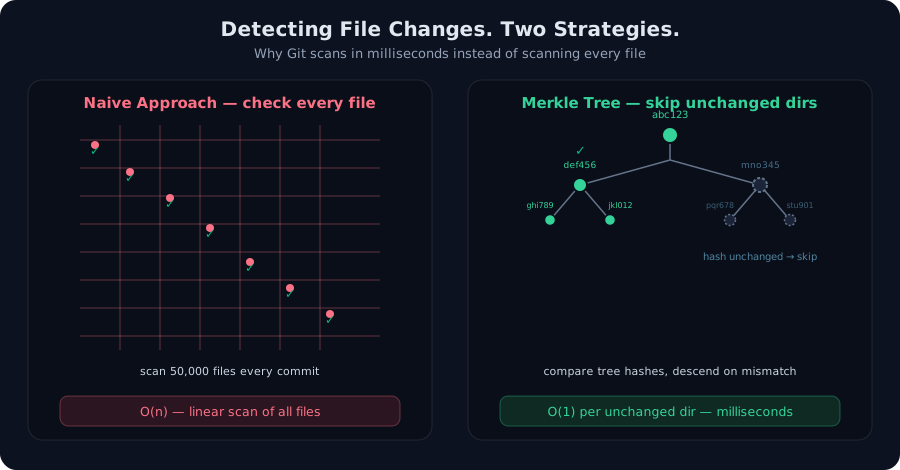 Left: scanning all 50,000 files every commit. Right: comparing tree hashes and skipping unchanged directories.
The Naive Approach: Scan Everything
The obvious way to find file changes is to scan the filesystem. Compare the modification time of every file to the previous state, or hash every file and compare the results. It works. It’s simple. It’s also O(n)—linear in the number of files you have.
On a small project with 100 files, this takes a few milliseconds. On a monorepo with 100,000 files, you’re hashing gigabytes of data on every git status. Modern SSDs are fast, but the bottleneck isn’t speed—it’s that you’re doing redundant work. If nothing changed in a /docs directory, why hash every Markdown file in it again?
The naive approach wastes time on proof of the obvious: if directory /lib hasn’t changed and nothing inside it has changed, then you don’t need to verify its contents. That’s the insight that breaks the problem open.
The Breakthrough: Merkle Trees
A Merkle tree is a bottom-up cryptographic hash structure. Here’s how Git uses it:
- Blobs: Every file is hashed (with its content and path) into a blob object. The hash is cryptographic (SHA-1 historically, SHA-256 going forward), so two identical files produce identical hashes.
- Trees: Every directory is hashed as a tree object—the hash depends on the hashes of its children (files and subdirectories), not the file contents themselves.
- Commit: A commit object hashes the root tree (and metadata like author, timestamp, parent commit).
The magic: if a tree’s hash equals the hash from the previous commit, then every file and subdirectory inside that tree is provably unchanged. Git doesn’t need to descend into it.
When you change one file in /src/components, only the blob for that file hashes differently. Its parent tree (/src/components) hashes differently. Its grandparent (/src) hashes differently. The root tree hashes differently. The commit hash changes. But /lib, /docs, /tests—anything untouched—keeps its original hash, and Git skips them in one comparison.
This transforms the problem: instead of O(n) file scanning, Git does O(log n) hash comparisons down the tree hierarchy, descending only where hashes differ.
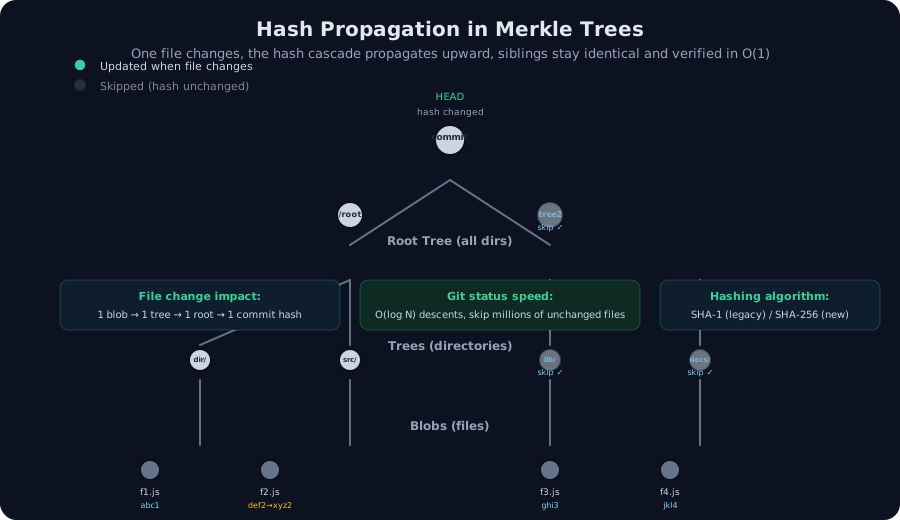 One file changes, its hash updates, the change propagates upward. Unchanged branches with identical hashes are skipped entirely.
The Mechanism: How Git Descends
When you run git status, here’s what Git actually does:
- Load the previous commit’s root tree hash from
.git/refs/heads/main(or HEAD). - Read the current filesystem’s root tree hash (or compute it if it doesn’t exist locally).
- Compare the two hashes.
- If they match: nothing changed. Done.
- If they differ: read the tree object for both commits.
- For each child in the tree:
- If the child’s hash matches: that file or directory is unchanged. Skip it.
- If the child’s hash differs: that file changed, or the directory has changed contents. Mark it as modified and recurse into the directory if it’s a tree.
The recursion bottoms out at files (blobs). The result: Git visits only the changed paths and their ancestors up to the root. On a 50,000-file repository where you edited one file, Git descends one path and skips 49,999 files.
Complexity: If you have D directories and you change files in K of them, Git does O(K × log D) work—proportional to the number of changes, not the total repository size. For a single-file edit in a typical repo, that’s under 100 milliseconds.
Cryptographic Hash: SHA-1 and the Migration to SHA-256
Git’s Merkle tree is cryptographic. Every object is identified by the hash of its contents. Historically, Git used SHA-1, which produces 160-bit hashes. That was safe for decades. But in 2017, practical collision attacks on SHA-1 became feasible (Google’s SHAttered attack). While Git repositories haven’t been compromised by this weakness, the theoretical risk is real at scale.
Git is now migrating to SHA-256, which produces 256-bit hashes with no known practical collisions. The migration is gradual—Git can read both formats and is adding the infrastructure to rewrite repositories with new hashes. Old repositories won’t break; new ones will use SHA-256 by default.
The hashing algorithm doesn’t change the tree structure, only the hash size and collision resistance.
Trade-Offs and Limitations
Merkle trees are fast for the common case (checking a mostly-unchanged repo), but they have costs:
- Deduplication overhead: Git must store every object (blob, tree, commit) in the object database, indexed by hash. This means identical files (across commits or branches) are stored once, but the index still has a small overhead.
- Shallow clones: Because the tree references are part of the commit, you can’t easily clone only a subset of history without downloading the full Merkle structure for that range.
- Rewriting history: Changing a commit (via
git rebaseorgit filter-branch) requires recomputing hashes all the way up the tree, then updating all descendant commits. This is why rewriting shared history is dangerous—it changes every descendant commit hash.
When not to use Merkle trees: They’re optimized for version control, where you want to detect changes without scanning. For applications like databases that need to verify every write, or distributed systems that need proof of data consistency, you might want stronger guarantees (Merkle proofs, for example, let you prove that a specific leaf is in the tree without downloading the entire tree).
Merkle Trees in Integrity and Deduplication
Beyond status checking, Merkle trees power two other Git features:
- Integrity: The hash chain means tampering with one object requires recomputing every ancestor hash. An attacker can’t silently change a file in a commit without changing the commit hash. That’s why comparing commit hashes is a reliable integrity check (assuming you get the hash through a trusted channel).
- Deduplication: Two repositories with the same file store one copy of the blob object (identified by its hash). Pack files then compress these objects efficiently. This is why cloning a large repository doesn’t require storing every version of every file—Git stores one content-addressed object per unique state.
SHA-1 vs SHA-256: The Practical Transition
As of Git 2.29+ (2020), you can configure SHA-256 support. The format remains compatible; what changes is the hash algorithm and the commit/tree/blob identification. Existing SHA-1 repositories can be migrated incrementally. Most developers won’t notice the change—Git will handle it transparently—but the safety margin is substantially longer.
The Merkle tree structure doesn’t change. Only the hash bits do. This is why Git’s migration doesn’t require a complete rewrite, just a gradual transition of newly created objects.
Why This Matters
A Merkle tree is the reason git status is fast even on massive repositories. It’s why Git can deduplicate content across commits. It’s why changing one file in a monorepo doesn’t require re-hashing everything. The structure is elegant because it’s minimal: you need only the hashes themselves to verify integrity, and only the changed paths to detect changes.
For engineers shipping version control at scale—or building any system that needs to detect changes efficiently—the Merkle tree is the canonical solution. It trades off simplicity (you need to understand hashing) for speed and correctness. Git’s widespread adoption is proof that the trade-off pays.
Every time you run git status in milliseconds instead of seconds, you’re benefiting from Merkle trees.
Frequently asked questions
How does Git detect file changes without scanning every file on disk?
Git builds a Merkle tree: files are hashed into blob objects, directories into tree objects, and trees into a root tree. If a tree's hash matches the previous commit, everything inside is provably unchanged. Git skips entire subtrees, descending only where hashes differ. This reduces checking millions of files to comparing a handful of hashes.
What happens when a single file changes in a Git repository?
When one file changes, its blob hash changes, causing its parent tree hash to update, which propagates to the root tree hash and finally the commit hash. Unchanged sibling files and directories keep their hashes identical, so Git's status check skips them entirely—only changed paths trigger verification.
Why did Git migrate from SHA-1 to SHA-256?
SHA-1 produces 160-bit hashes with a known collision weakness. After 30+ years, collision attacks became practical, posing a theoretical integrity risk for very large repositories. SHA-256 provides 256-bit output with no known practical collisions, offering decades of safety. Git's migration is gradual to avoid breaking existing workflows.
Does the Merkle tree structure help with deduplication across repositories?
Yes. When you clone a repository, Git downloads pack files containing deduplicated objects by their hash. Two repositories with identical files store one copy per hash value. Pack files use delta compression within objects and can be transferred between repos. This is why Git repositories can be remarkably space-efficient compared to storing snapshots.
Can the Merkle tree guarantee that a commit hasn't been tampered with?
The hash chain provides integrity within a repository: changing any file requires recomputing every ancestor hash up to the commit, which would alter the commit hash. An attacker would need to forge a new commit hash. For remote repositories, you verify the commit hash through HTTPS (PKI) or by comparing against a trusted copy. The Merkle structure makes tampering expensive but doesn't prevent it remotely without an authenticated channel.
/* Comments */
Comments are offline right now — we reconnect automatically, nothing is lost.