BigQuery Cross-Cloud Connections Change Where Queries Run
BigQuery's GA cross-cloud connections expose AWS, Azure, and Data 360 data in standard regions, with caching and governance trade-offs to plan.
On this page
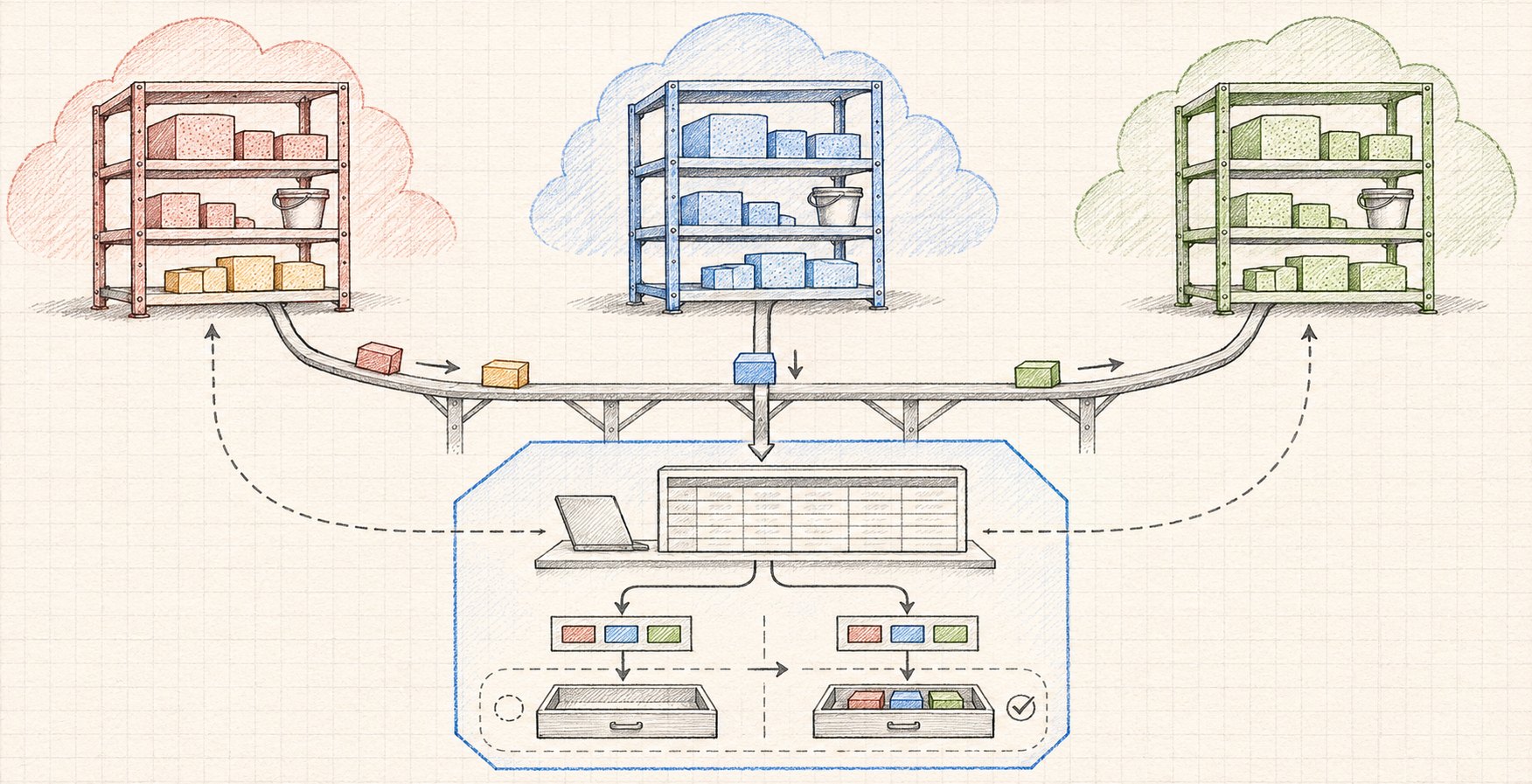
A lakehouse can be spread across providers for years before anyone gets permission to move the data. A cross-cloud connection is useful in that moment: analysts can ask BigQuery to read data in another cloud while keeping the source system as the place where the files live. Google announced general availability for cross-cloud connections on November 25. The feature supports AWS, Azure, and Salesforce Data 360, and it runs from standard BigQuery regions rather than requiring a BigQuery Omni region. [1]
The change is not simply “BigQuery can now query other clouds.” BigQuery Omni already offered remote querying without moving data. Google’s documentation describes the new connection path as an alternative that provides more access to BigQuery features, uses standard BigQuery slot reservations and commitments, and can optionally cache fetched file blocks in the BigQuery region. The architecture choice is therefore about where compute and features are available, how often the same remote blocks are read, and which cloud movement or governance costs the team accepts. [2]
Two different ways to read remote data
A BigQuery connection is a resource that carries access configuration for a remote source. For AWS, the documented setup creates an IAM role and a connection identity; for Azure it uses an application and federated identity. The external data can then be represented through BigLake tables or supported federated datasets. The first operational task is not writing SQL. It is deciding which principal should read which data, then creating and testing that trust path with least privilege. [2]
BigQuery Omni and cross-cloud connections differ in where the query capability is presented. Omni runs lightweight workers in remote regions so BigQuery can query data without moving it out of that cloud. Cross-cloud connections make data available to a BigQuery project in a standard Google Cloud region, which is why the docs describe access to BigQuery AI capabilities, materialized views, user-defined functions, and other features that standard Omni connections do not provide. If your use case needs an Iceberg catalog or query engines beyond BigQuery, Google points to its separate borderless lakehouse option. [2]
That feature surface can matter more than the provider label. A team that needs a particular BigQuery SQL feature may prefer to read selected external data through the new path; a team whose primary requirement is querying without data movement may find the established Omni model a better fit. Treat the product documentation as a description of supported paths, not proof that every query shape, file format, or region behaves identically.
Caching is useful, but it creates a second data location
Cross-cloud caching is optional and disabled by default. When enabled, BigQuery caches retrieved remote file blocks in the connection’s Google Cloud region, so repeated reads of the same blocks can avoid fetching them again. Google says this can reduce cross-cloud egress costs and improve query speed; those are provider-described benefits, not a workload-specific guarantee. The cache has its own retention and pricing documentation, so it belongs in the data-location review rather than being treated as a transparent performance toggle. [2] [4]
A practical design review should ask four questions. Which objects will queries touch repeatedly? How long may the fetched blocks remain cached? Which BigQuery region will hold those blocks? Who is authorized to read them there? A workload that scans different partitions once may see little reuse. A dashboard that repeatedly reads the same dimension files might benefit more. Neither pattern should be assumed from a small pilot query; measure it with the actual file layout and access pattern.
Place the connection before optimizing the query
Google recommends choosing a standard BigQuery region physically close to the remote data for cost and performance efficiency, and publishes suggested region pairings. Those are starting points, not a replacement for a residency assessment or a measured latency test. Cross-cloud queries still cross provider boundaries; region proximity does not erase network transfer or contract constraints. [2]
The operational checklist is concrete:
- Identify the data products and file formats that must be queried, and confirm the connection type supports them.
- Put the BigQuery connection in a region allowed by both the data policy and the workload’s latency needs.
- Create the narrowest AWS role or Azure application permissions that serve the query, then test using the intended analyst or workload identity.
- Start with caching disabled. Record query duration, bytes read, slot use, remote transfer and repeat-query behavior.
- Enable caching only after the security, retention and cost owners agree on the additional regional copy.
- Compare the result with the current Omni or ingestion path using a representative workload, including failures and refresh behavior.
The BigQuery release notes also carry a separate Storage API change: v1beta1 access is restricted to projects with historic activity and is scheduled to shut down on August 31, 2027. That is not part of cross-cloud connections, but teams modernizing BigQuery data paths should inventory any direct v1beta1 clients independently and migrate to v1. [1]
For a broader view of cloud data trade-offs, see our guide to building an analytics pipeline across cloud and lakehouse boundaries. The right choice is not the one with the fewest diagrams; it is the path whose data movement, identity, feature coverage and recurring cost can be explained to the people who own them.
What general availability does—and does not—settle
GA gives teams a supported product path to evaluate. It does not establish that cross-cloud reads are faster or cheaper for every dataset, that caching fits every residency regime, or that every external source can be queried with every BigQuery feature. Those decisions require a workload-level test and a clear inventory of where source data and cached blocks reside.
For an analyst, the immediate opportunity is broader use of BigQuery’s standard-region feature set over supported remote data. For a platform team, the new work is to model trust, regions, cache policy and cost as first-class parts of query design. Cross-cloud SQL is the visible interface; the architecture is the contract behind it.
Frequently asked questions
What is a BigQuery cross-cloud connection?
It lets BigQuery query supported AWS, Azure, and Salesforce Data 360 sources from a standard BigQuery location. The connection is an alternative to BigQuery Omni and exposes data to more BigQuery features, but it changes how data is accessed and may involve cross-cloud transfer and caching.
Does a cross-cloud connection copy an entire dataset into BigQuery?
No. It lets BigQuery query supported external data sources. Optional cross-cloud caching stores retrieved file blocks in the BigQuery connection's region; it is disabled by default.
When should a team consider BigQuery Omni instead?
Google positions Omni for querying without data movement and cross-cloud connections for access to more BigQuery features in standard regions. Compare the needed SQL features, residency rules, egress, caching, and query costs for your workload.
Sources & further reading
Keep reading

Managed Airflow’s Agentic Upgrade Check Is a Code Review, Not a Test Run
Google's read-only Managed Airflow Agent inspects DAGs and support files for version changes, but static analysis cannot certify runtime compatibility.
How Agoda Built a Financial Single Source of Truth: FINUDP, Apache Spark, and GoFresh Auditing
How Agoda unified competing financial data pipelines into a single source of truth: Apache Spark, FINUDP architecture, and GoFresh data validation.
When Databases Do the Wrong Job: How Datadog Built a CDC Replication Platform on Kafka
How Datadog overcame 7-second database latency by building a Change Data Capture (CDC) platform using PostgreSQL WAL, Debezium, Kafka, and search engines.
/* Comments */
Comments are offline right now — we reconnect automatically, nothing is lost.