GitHub Issue Statuses Give Teams a Shared Middle Between Open and Done
GitHub adds seven issue statuses and repository boards in public preview. Here is how its workflow rules behave and what teams should test.
On this page
An issue can be open and still mean almost anything: not started, actively being built, waiting for review, or blocked on a decision. GitHub’s new public preview gives issues a more expressive status, then puts that status on a board view inside the repository.
The useful change is a shared lifecycle signal. It can help a maintainer, a teammate, and an assigned coding agent read the same “what happens next?” state without translating between open/closed, labels, and a separate project board. It is still a preview, so teams should treat it as a workflow to evaluate rather than a finished replacement for every planning tool.
Seven statuses, plus a few automatic transitions
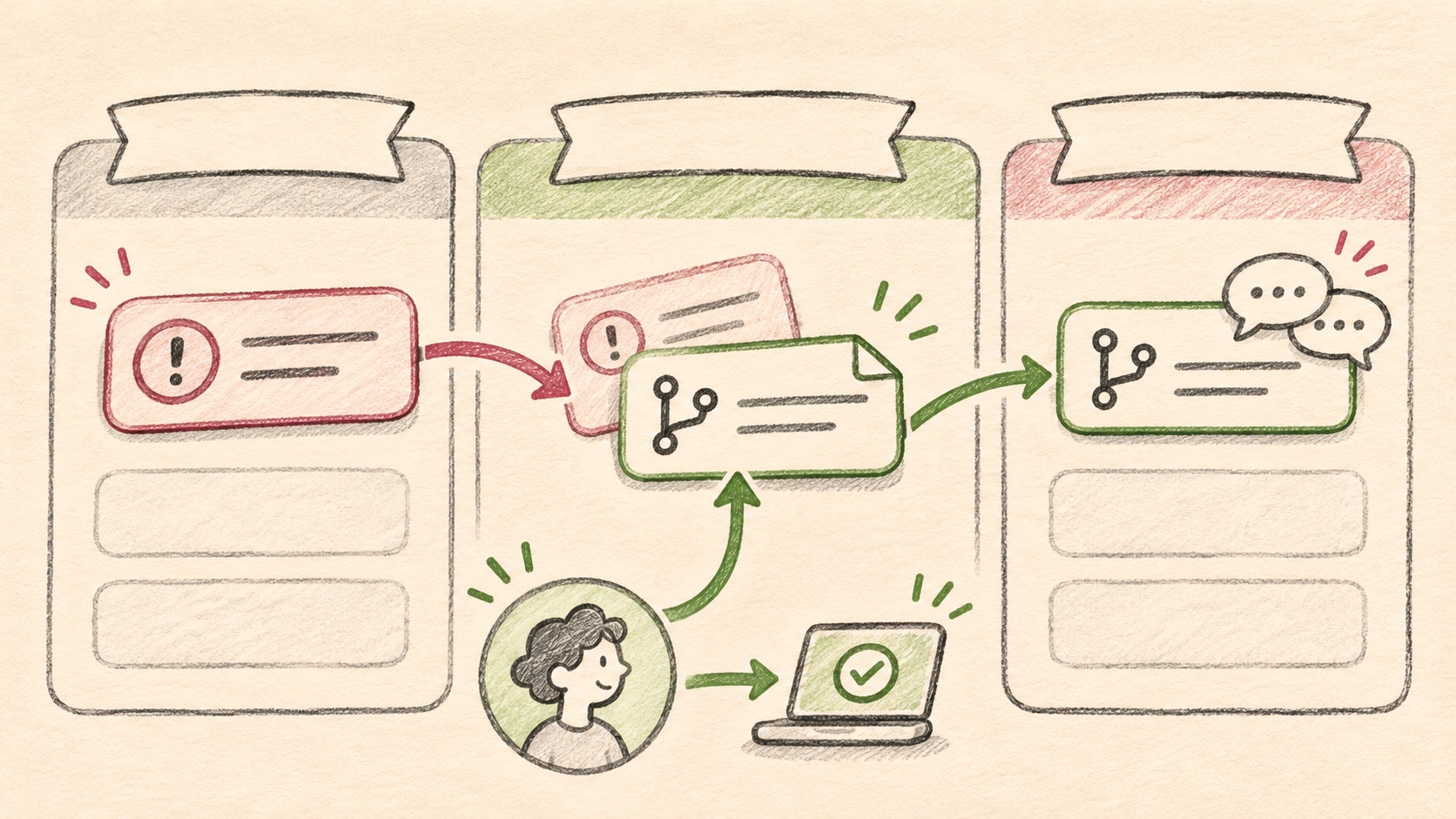
The preview offers Backlog, Todo, In progress, In review, Done, Not planned, and Duplicate. Status appears in issue icons, the repository issue list, the issues dashboard, and repository boards. [1] The announcement also documents transitions: assigning a person moves an issue to Todo; assigning an agent moves it to In progress; linking a draft pull request moves it to In progress; marking that draft ready for review or linking an open pull request moves it to In review.
These rules make status useful as machine-readable context. An automation can filter on status: or respond to status changes, while an agent can read or set the field through GraphQL, REST, and GitHub’s MCP server. That creates a more legible handoff than asking an agent to infer progress from a comment or label.
The automation is also a policy choice. A team that assigns agents for triage may not want every assignment to imply implementation has begun. A draft pull request can be linked before it is ready for review. Before adopting the defaults, write down what each transition means in your own workflow and check whether the automatic transitions match it.
Boards stay close to the repository
Repository saved views can now switch to a board layout, group issues by status, and let users drag cards between columns. Columns, swimlanes, visible fields, and sorting can be configured. GitHub positions this as a quick repository-level view; teams needing more advanced planning can still use GitHub Projects.
That distinction matters. A repository board can reduce the context switch for a team that mainly works in one codebase. It does not, by itself, solve cross-repository planning, dependency mapping, capacity planning, or portfolio reporting. Those are reasons to retain a Project or another planning surface.
A practical rollout
Start with one repository and a small set of real issues. Decide which statuses your team will actively use, then test the assignment and pull-request transitions with representative workflows. Check whether project status values match the issue statuses exactly before relying on synchronization. Finally, inspect how filters and automations behave for issues that are not planned or are duplicates.
Keep the old conventions visible during the preview. If labels or project fields still drive reports, document which field is authoritative and avoid updating both by hand. A new status field helps only when people and tools agree on what it means.
The announcement does not establish that every account has access, nor does it promise that these preview behaviors will remain unchanged. Teams should confirm availability in their own repositories and revisit their setup as the preview evolves.
The bigger idea: make work state portable
The strongest part of this release is not the board itself. It is the possibility that workflow state becomes portable across the issue page, project view, API, and agent interface. If that state remains accurate, people can delegate work without losing the thread. If automatic transitions encode assumptions the team does not share, the same system can make an inaccurate status look authoritative.
Treat the preview as a chance to test a small, explicit workflow contract: who moves an issue, which actions move it automatically, and what evidence means it is done. That contract is what makes a status useful to humans and automation alike.
Related reading
If your work spans several repositories or depends on long-running jobs, our guide to workflow orchestration explains when a board is not enough. Teams can also compare the status field with our explainer on state in distributed software design.
Frequently asked questions
Do GitHub issue statuses replace open and closed?
No. Statuses add more detail about work progress, while the issue still has its open or closed state. Teams can use values such as Backlog, In progress, In review, and Done to describe the workflow more precisely.
Can issue status be synchronized with a GitHub Project?
Yes, when a project has a status value that matches an issue status, changing either one updates the other. Teams should verify their existing project values before enabling workflow automation.
Sources & further reading
Keep reading
GitHub Copilot Code Reviews Will Shift to Organization Billing by Default
Unset Copilot code-review billing policies change on December 30. Check AI Credits, spending limits, and the Member setting before the default moves.

GitHub’s Notification Migration Changes What ‘Unsubscribe’ Means
GitHub.com’s December migration changes resubscription, team mentions, and email reasons. Audit inbox filters and team workflows before rollout.
GitHub’s Coverage Upload Check Moves Report Errors Earlier in CI
GitHub Code Quality now rejects coverage uploads that are not Cobertura XML. Validate report producers before making the stricter check a gate.
/* Comments */
Comments are offline right now — we reconnect automatically, nothing is lost.