
Google’s Gemini Agent Puts Enterprise Workflows Behind One Prompt
Google Cloud’s Gemini agent promises cross-system work orchestration; the hard enterprise questions are permissions, handoffs, auditability and safe completion.
On this page
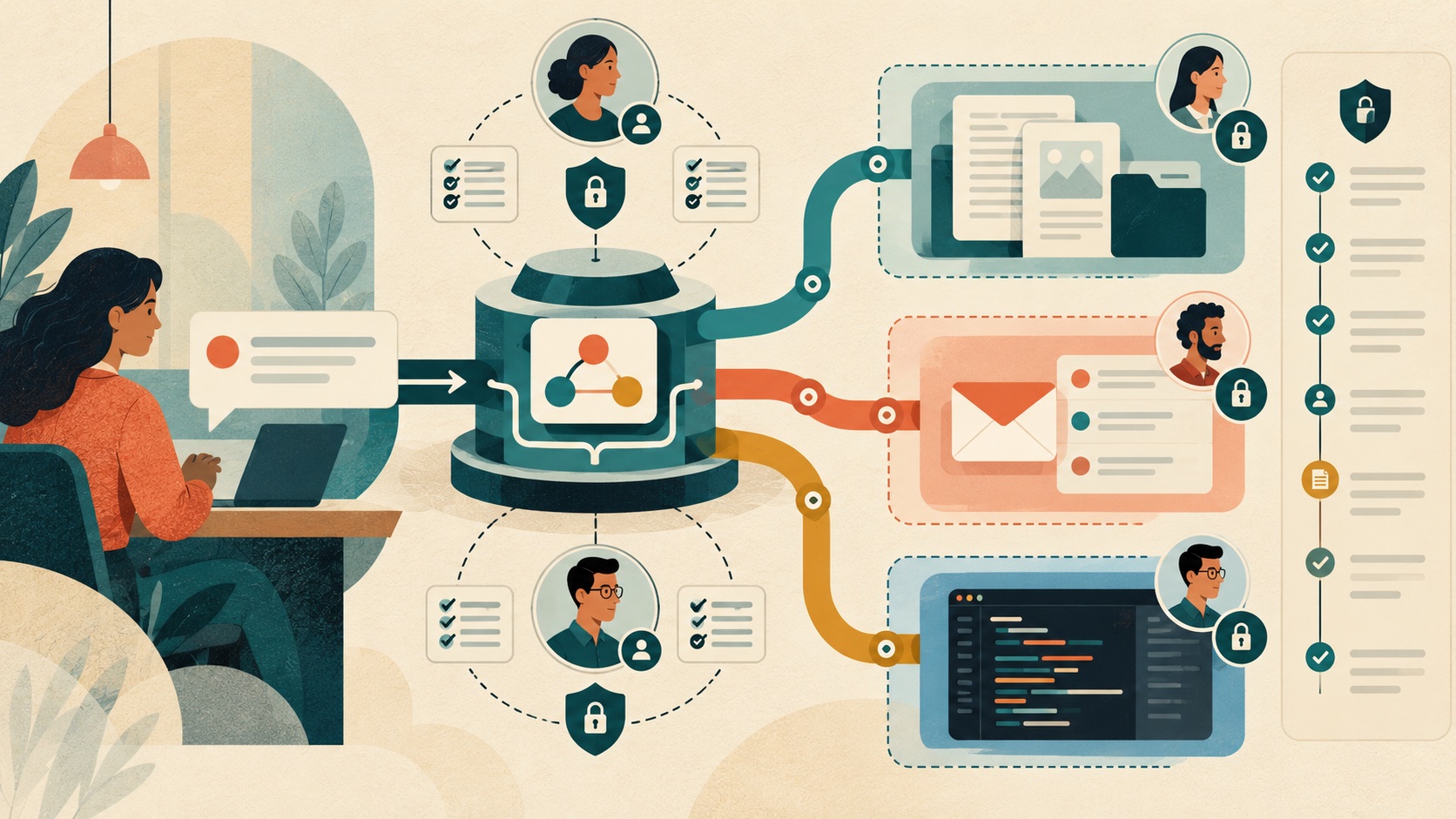
A single prompt box sounds like a shortcut through an organization’s software maze. Google Cloud’s October announcement of the Gemini agent is built around that idea: describe work once, let an agent plan and use tools across business systems, and receive a finished result in the places teams already work. The practical test is not whether the agent can connect many systems. It is whether the organization can keep each connection understandable and bounded.
The promise is orchestration, not another chatbot
Google’s announcement describes an agent that can use an organization’s business context, plan work, invoke skills and tools, connect to customer systems, and return outputs in documents, inboxes and developer environments. The company says the system can select a model for a task and includes cost controls, administration and governance. This is a product announcement and vendor description; exact integrations and availability should be checked against current Cloud documentation. [1] [2]
The appeal is straightforward. Employees repeatedly move information across applications: retrieve a document, extract a few facts, draft a reply, update a ticket and notify a teammate. A workflow agent could reduce that context switching. But every hop crosses a separate authority boundary. A request that starts as “summarize this” can become a write to a shared document or a message sent to a customer if tool permissions are broad and the agent’s plan expands.
One interface can hide many permissions
The underlying design should make actions legible. Can the agent read a folder but not edit it? Can it draft an email but not send it? Does it use the employee’s rights, a service identity or a delegated permission? Are those permissions limited by system, time and task? Can an administrator see which connector was used and what action followed?
These questions are not unique to Google. NIST’s AI Risk Management Framework and its Generative AI Profile encourage organizations to map, measure and manage risks across the AI lifecycle, including human oversight, monitoring and clear accountability. They do not endorse this product or prescribe one connector architecture, but they provide a useful checklist for evaluating any agent that can touch business data and workflows. [3] [4]
A sensible rollout separates read operations from actions with external consequences. Start with a bounded knowledge source and read-only tasks. Then test drafting and proposed changes with a human approval step. Only expand to sending, publishing or modifying records after teams can inspect logs, recover from mistakes and determine which identity authorized each operation.
Completion needs evidence
A result that looks finished is not necessarily correct. For a multi-step workflow, organizations need evidence about the sources used, the actions attempted, any permission failures, and whether the final state matches the request. If a connector silently drops a step or an agent misinterprets a document, the user should be able to see and correct the handoff rather than discover the error downstream.
This suggests a practical success measure: not how many tools the agent can call, but how many bounded tasks it completes with the right source material, correct permissions and reviewable outcomes. Track errors and reversals as well as time saved. Keep a way to disable one connector or one class of action without taking the entire assistant offline.
What buyers should ask now
Before adopting a cross-system agent, ask the vendor and internal platform team for a connector inventory, identity model, data-retention behavior, action-level permission controls, audit event format, approval configuration, and emergency revocation path. Test a real but low-risk workflow that includes an ambiguity, a denied action and a recovery. Make sure logs show enough to explain the result without exposing more private data than necessary.
Google’s announcement points toward a useful change in how software is operated: people state a goal and systems coordinate the steps. Whether that becomes reliable enterprise infrastructure depends on all the mundane details hidden behind the prompt—least privilege, visible handoffs, dependable logs and clear ownership. Those details should be part of the product evaluation from day one, not a security review after the agent has accumulated access.
Frequently asked questions
What did Google announce with the Gemini agent?
Google Cloud describes a universal work agent that can plan tasks, use skills and tools, connect to business systems, and return work inside documents, inboxes, and developer environments. The announcement describes the product direction; availability and integrations should be checked in current Google Cloud documentation.
What should companies check before using an enterprise work agent?
Map which systems the agent can read or change, how each action is authorized, what requires human approval, how activity is logged, and how access is revoked. A single prompt interface does not make permissions or data boundaries disappear.
Sources & further reading
Keep reading

Meta’s Prometheus Cluster Treats a GPU Rack as a Failure Domain
Meta’s Prometheus account shows how spare GPUs, checkpointing and network design make reliability a capacity tradeoff.
Oracle Wants Fusion Agents to Own Outcomes. Start by Mapping the Handoffs
Oracle’s new Fusion Companion and Agentic Home can coordinate work across business apps. The hard part is deciding what an agent may finish alone.

OpenAI's Rosalind Academic Plan Has a Narrow Lab-Shaped Door
The Rosalind Academic Plan offers up to 30 seats for eligible US university labs for up to a year, but excludes API access and requires trusted-access review.
/* Comments */
Comments are offline right now — we reconnect automatically, nothing is lost.