
AWS Step Functions Gives AI Agents a Safer Door Into Existing Workflows
AWS now exposes Step Functions workflows as AgentCore Gateway tools. The agent can choose a workflow and input; the state machine still controls execution.
On this page
A support agent may be good at recognizing that a refund is needed. The risky part is letting a language model improvise the refund process. AWS’s new Step Functions connector offers a narrower pattern: let an agent choose an existing workflow, then let the state machine carry out the defined steps.
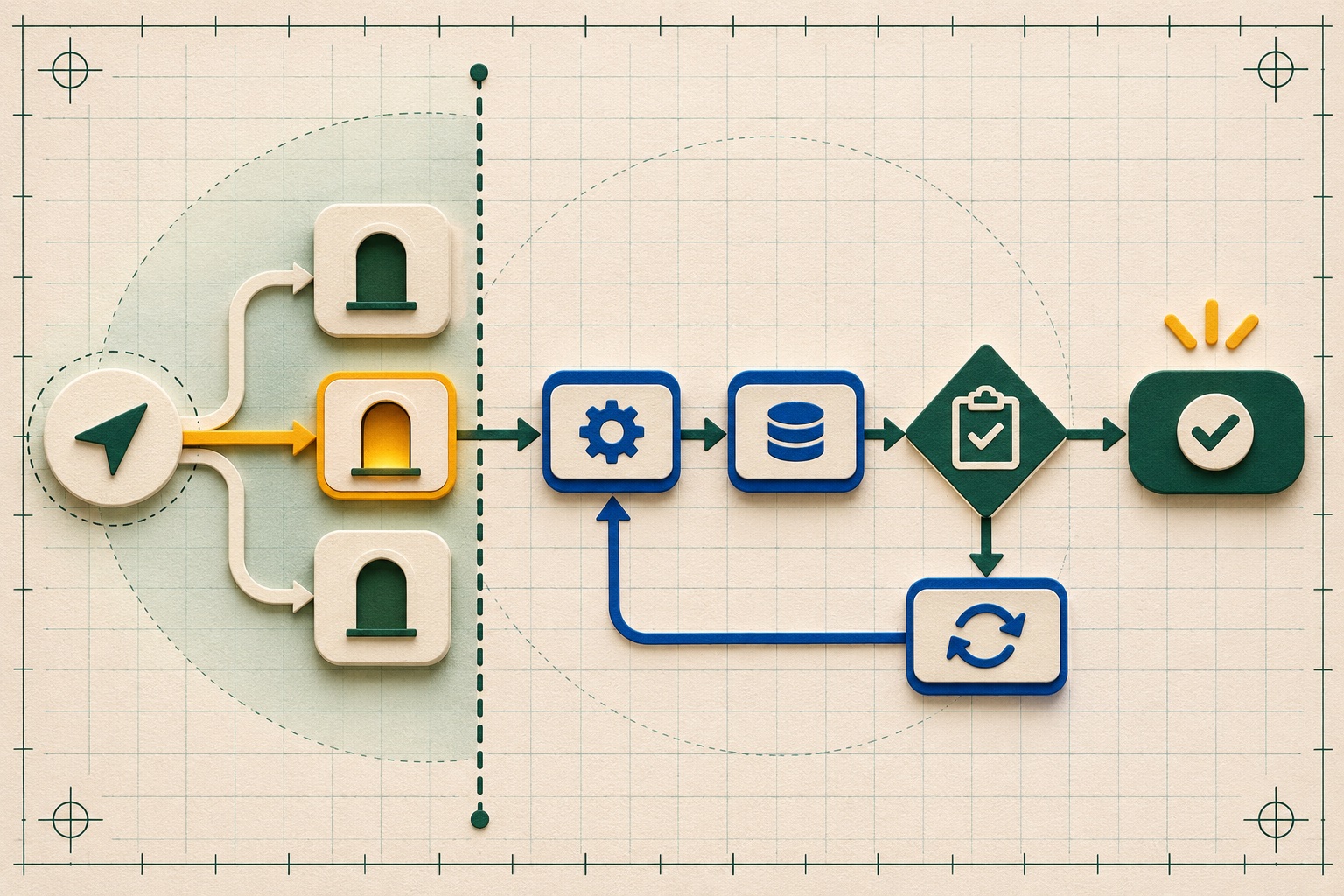
AWS announced on October 29 that Step Functions workflows can be used as tools for AI agents through Amazon Bedrock AgentCore Gateway. The announcement says both Standard and Express workflows are supported. An agent decides when to run a workflow and what input to pass; Step Functions executes the steps as defined. AWS’s example is a support agent invoking a refund workflow that performs eligibility checks, manager approval, and a credit step. Agents can also look up workflow runs to identify where an operation failed. [1]
The connector is available in regions where AgentCore Gateway is available. AWS says the normal Step Functions and AgentCore Gateway charges apply. The exact region list, setup requirements, and supported operations can change, so teams should use the current service documentation when designing a deployment. [1] [2] [3]
Let the model choose the door, not invent the process
An agent exposed directly to many low-level operations may decide to call them in an unexpected order. In a workflow-tool pattern, the team exposes a small number of named business operations. The model can select among those operations and provide an input, but the machine-readable state definition controls what happens next.
This separation is useful because the workflow is where engineers can encode the stable sequence: verify eligibility, record the request, request an approval, then issue a credit. Step Functions provides workflow states and execution history; the agent tool simply offers another way to start or inspect those executions. AWS’s tutorial and connector reference describe how to configure a state machine as an AgentCore Gateway target. [2] [3]
The pattern is not a safety guarantee. If an agent can call a tool that moves money, changes access, or modifies customer data, the tool’s permissions and inputs still define the real blast radius. A workflow that accepts an arbitrary account identifier or unbounded amount can remain unsafe even when its steps are deterministic. A workflow that silently skips human review is still a workflow without human review.
The prudent design is to make exposed workflows narrow, validate all agent-provided input, set the least permissions needed, and use explicit approval states where an operation can materially affect a person or organization. Log which tool was selected, which execution started, what input was accepted, and how the execution ended. Keep a way to stop or compensate for work that has begun.
Existing automation becomes callable, with new trust boundaries
For teams that already use Step Functions, the integration can be less disruptive than rewriting business operations as bespoke agent code. An existing workflow can retain its sequencing and error behavior while an agent uses it as one of its tools. AWS says the gateway uses the Model Context Protocol to connect agents to tools, and its connector guide provides the setup path. [1] [3] Our MCP overview explains the general client-to-tool boundary, while the agent OAuth eligibility guide covers identity checks when tools act for a user.
But existing workflows were often designed for a human, a backend service, or a fixed event to start them. Before exposing one, check how the execution starts, what input the workflow accepts, and whether the caller’s identity and permissions remain meaningful through the gateway. If a task needs a human approval, preserve that state rather than turning it into a model judgment. If the workflow has retries or compensating actions, verify that the agent can observe the resulting execution instead of starting a duplicate run when it sees a slow response. Step Functions documentation describes error handling and retry behavior that teams should review for the operations they expose. [4]
An agent should also receive enough feedback to decide what to do next without guessing. A workflow can return a stable execution identifier, status, and permitted next action. Avoid returning secrets, unnecessary personal data, or a large raw execution history to the model. The agent is an orchestrator at the edge of the workflow; it should not become the only audit record.
How to evaluate a first use
Choose an operation that is bounded, already well tested, and easy to observe. Start in a non-production account or with a dry-run version if the workflow supports one. Test ordinary and malformed inputs, permissions failures, timeout behavior, approval refusal, retry handling, and duplicate requests. Confirm that an agent cannot invoke workflows outside the set intended for its role.
Then compare what the agent is good at—understanding a request and selecting an operation—with what deterministic automation does better—enforcing sequence, validation, and state transitions. If the workflow has to infer missing business rules from a prompt, the boundary is in the wrong place. Encode those rules in the workflow or a service it calls, and let the agent gather only the information it needs to request the operation.
The broader lesson is that AI automation does not require making every step probabilistic. Exposing a well-scoped workflow can let an agent interpret intent while leaving consequential execution to a defined process. The new AWS connector makes that design easier to wire up, but the trust boundary still belongs to the system builder.
Frequently asked questions
What changed in the AWS Step Functions integration?
AWS says existing Standard and Express workflows can be exposed as tools through Amazon Bedrock AgentCore Gateway. An agent can select a workflow and pass input, while Step Functions runs the workflow's defined steps.
Does exposing a workflow to an agent make it safe by default?
No. Teams still need to choose which workflows are exposed, validate inputs, set appropriate permissions, and retain approval or other controls for consequential steps. The integration changes how a workflow is invoked, not the correctness of its design.
Where is the capability available?
AWS says the capability is available in AWS Regions where Amazon Bedrock AgentCore Gateway is available. Standard Step Functions and AgentCore Gateway charges apply.
Sources & further reading
Keep reading

Palantir’s Audit Explorer Logs the Searches Auditors Make. That Is Useful—and Incomplete
The beta makes audit-log review easier and records each search, but its own documentation lists what those search records do not capture.

Cloud Sovereignty Is a Control Test, Not a Map Pin
EU cloud sovereignty means more than data location. Map operational control, legal exposure, dependencies and recovery for each workload.

AWS CodeDeploy RESTART Reuses a Revision, but Your Fleet Still Needs a Drain Plan
CodeDeploy RESTART reapplies an EC2 or on-prem revision under deployment safeguards. See its agent, lifecycle and traffic-drain requirements.
/* Comments */
Comments are offline right now — we reconnect automatically, nothing is lost.