
Malware Hid Inside a Popular Obfuscation Tool — and Went Hunting for Your AI Coding Agent's Credentials
Stolen npm credentials let attackers slip native-binary malware into jscrambler, hunting for Claude Desktop, Cursor, and Windsurf credentials.
On this page
jscrambler has spent over a decade selling developers on one promise: obfuscate your JavaScript so nobody can read it. For three hours on July 11, 2026, that same opacity worked in the other direction — hiding a credential-stealing binary inside the very tool teams install to protect their code, and pointing it squarely at the AI coding assistants that now sit on top of nearly every terminal.
What actually happened, and how fast did it move?
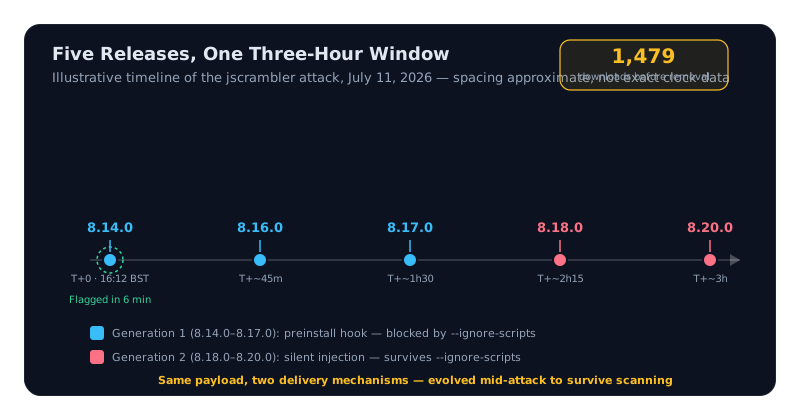
A threat actor with a stolen npm publishing credential pushed jscrambler 8.14.0 at 16:12:40 BST on July 11, 2026 — a release that looked routine but carried an undocumented preinstall hook. Socket’s scanners flagged it as malicious within six minutes of publication, by Socket’s own account of the incident. That speed didn’t stop the attacker: over the following three hours, four more compromised releases went out — 8.16.0, 8.17.0, 8.18.0, and 8.20.0 — interleaved with what looked like remediation attempts, according to Socket’s writeup of the timeline.
Four companion packages were hit in the same window, per Rescana’s advisory: jscrambler-webpack-plugin 8.6.2, gulp-jscrambler 8.6.2, grunt-jscrambler 8.5.2, and jscrambler-metro-plugin 9.0.2. Rescana puts total downloads of the compromised versions at 1,479 before removal — a modest number by supply-chain-attack standards, but every one of those installs ran arbitrary native code with developer-level machine access.
Why did a code-obfuscation tool become a malware delivery pipeline?
Because jscrambler already ships a preinstall step and platform-specific binaries as part of its normal operation — obfuscating and licensing code requires it — so a malicious payload wired into that same pipeline didn’t look out of place next to the legitimate one. Rescana’s technical breakdown describes the mechanism directly: the compromised preinstall hook executed dist/setup.js, which unpacked hidden native binaries — an ELF executable for Linux, a PE for Windows, a Mach-O for macOS — that ran automatically during installation or on package import.
jscrambler exists to make source code unreadable to competitors and pirates. That exact capability — shipping opaque, platform-specific binaries as a routine part of the install — is what let a credential stealer travel undetected inside a preinstall hook for six minutes, and inside the package tree for three hours after that.
How did the attack evolve once Socket started scanning?
It shifted delivery mechanism mid-attack, moving from an install-time hook to code that runs on import. Socket’s account of the five malicious releases shows two distinct generations of the same payload, separated by nothing more than a few hours and one round of detection.
- Malicious code ran automatically via npm’s preinstall lifecycle script the moment
npm installexecuted - Fully blocked by
--ignore-scripts, a standard hardening flag - Socket flagged 8.14.0 within 6 minutes of publication
- Same payload moved into self-executing functions inside
dist/index.jsanddist/bin/jscrambler.js - Survives
--ignore-scriptsbecause it runs on import/require, not on install - Published hours after the first version was already flagged as malicious
That second generation matters more than the raw download count. Rescana’s advisory is explicit that the later versions were built specifically to bypass install-script scanning and survive the --ignore-scripts flag — the exact protection npm’s own v12 overhaul is set to make the default within weeks. Jscrambler’s second-generation payload didn’t wait for that default to arrive; it was already built to route around it.
Why does it matter that AI coding assistants were an explicit target?
Because Rescana’s list of what the malware searched for puts Claude Desktop, Cursor, Windsurf, Factory, Zed, and VS Code in the same tier as AWS keys and MetaMask seed phrases — not as an afterthought, but as named, first-class targets alongside the credential categories attackers have chased for years.
| Target category | Specific items named in the advisories |
|---|---|
| AI coding assistants | Claude Desktop, Cursor, Windsurf, Factory, Zed, VS Code |
| Cloud providers | AWS, GCP, Azure |
| Crypto wallets | MetaMask, Trust Wallet, Coinbase Wallet, Phantom, Exodus |
| Other | Discord, Slack, Telegram Desktop, browsers, gaming platforms, OS keyrings |
Source: Rescana
The logic is straightforward once you follow what those credentials actually unlock. An AI coding assistant config or MCP credential often carries standing access to the same repositories and cloud accounts a developer would reach manually. A stolen assistant config isn’t a nuisance; it’s a working credential chain into everything that assistant was already authorized to touch — the same underlying failure mode behind Accenture leaking its own Azure keys five days earlier. Access, not exotic exploitation, is what most 2026 breaches actually run on.
What should developers do right now?
Check installed versions immediately, upgrade to the clean releases, and treat any credential reachable from an affected machine as compromised — both advisories describe active exfiltration, not just a discovered vulnerability sitting dormant.
Do
- Upgrade to jscrambler 8.22.0, or the matching clean plugin versions (8.6.3 / 8.6.3 / 8.5.3 / 9.0.3)
- Rotate every credential reachable from a machine that ran an affected install — cloud keys, AI assistant API tokens, wallet seed phrases
- Audit installation logs for execution of
dist/setup.js, per Socket’s indicator-of-compromise guidance
Don't
- Assume
--ignore-scriptsalone protected you — the Generation 2 releases bypassed it entirely - Treat AI coding assistant configs as low-value targets in your own threat model — the attackers clearly didn’t
- Let a dependency tree update itself silently; pin explicitly to the confirmed clean versions
The bigger signal here isn’t the 1,479 downloads — plenty of npm compromises hit larger numbers before anyone notices. It’s the target list. When attackers write AI coding assistants into their credential-harvesting scope by name, right alongside AWS and MetaMask, they’re telling you where the real value on a developer’s machine now lives.
Frequently asked questions
What is the jscrambler npm supply chain attack?
On July 11, 2026, attackers used a stolen npm publishing credential to push five malicious jscrambler releases over roughly three hours — 8.14.0, 8.16.0, 8.17.0, 8.18.0, and 8.20.0 — plus four compromised companion plugins. Each shipped hidden native binaries that harvested cloud, crypto-wallet, and AI coding assistant credentials, according to Rescana and Socket.
Which jscrambler versions were affected, and which are safe?
Malicious versions were jscrambler 8.14.0, 8.16.0, 8.17.0, 8.18.0, and 8.20.0, plus jscrambler-webpack-plugin 8.6.2, gulp-jscrambler 8.6.2, grunt-jscrambler 8.5.2, and jscrambler-metro-plugin 9.0.2. Clean releases are 8.22.0, 8.6.3, 8.6.3, 8.5.3, and 9.0.3 respectively — Rescana recommends pinning explicitly rather than trusting an automatic update.
Did the malware really target AI coding assistants like Claude Desktop and Cursor?
Yes. Rescana's advisory names Claude Desktop, Cursor, Windsurf, Factory, Zed, and VS Code explicitly among the malware's credential targets, alongside AWS, GCP, Azure, and five crypto wallets. That puts AI assistant configs in the same priority tier as cloud keys and wallet seed phrases.
Does npm install --ignore-scripts protect against this attack?
Only partially. Early versions (8.14.0–8.17.0) ran through a preinstall hook that --ignore-scripts blocks entirely. Later versions (8.18.0, 8.20.0) moved the same payload into dist/index.js and dist/bin/jscrambler.js as self-executing functions, which run automatically on import or CLI use regardless of that flag being set.
What should I do if I installed a compromised jscrambler version?
Upgrade immediately to the clean releases (jscrambler 8.22.0 or the matching plugin versions), then rotate every credential reachable from that machine — cloud keys, AI assistant API tokens, and crypto wallet seed phrases. Socket also recommends reviewing installation logs for execution of dist/setup.js as an indicator of compromise.
/* Comments */
Comments are offline right now — we reconnect automatically, nothing is lost.