
Snowflake Adds a Log-First Mode for Prompt-Injection Guardrails
A new LOG option records suspected prompt injections without changing responses, giving teams a way to inspect detections before enabling blocking.
On this page
A security control that blocks suspicious input can also interrupt a legitimate workflow. A control that only logs detections avoids that interruption, but leaves the request running. Snowflake’s November 18 release note adds an optional mode setting to Cortex AI Guardrails: LOG scans and records possible prompt injections without changing responses; BLOCK, the default, acts on detections. This is useful as an evaluation step, provided nobody mistakes observation for protection.
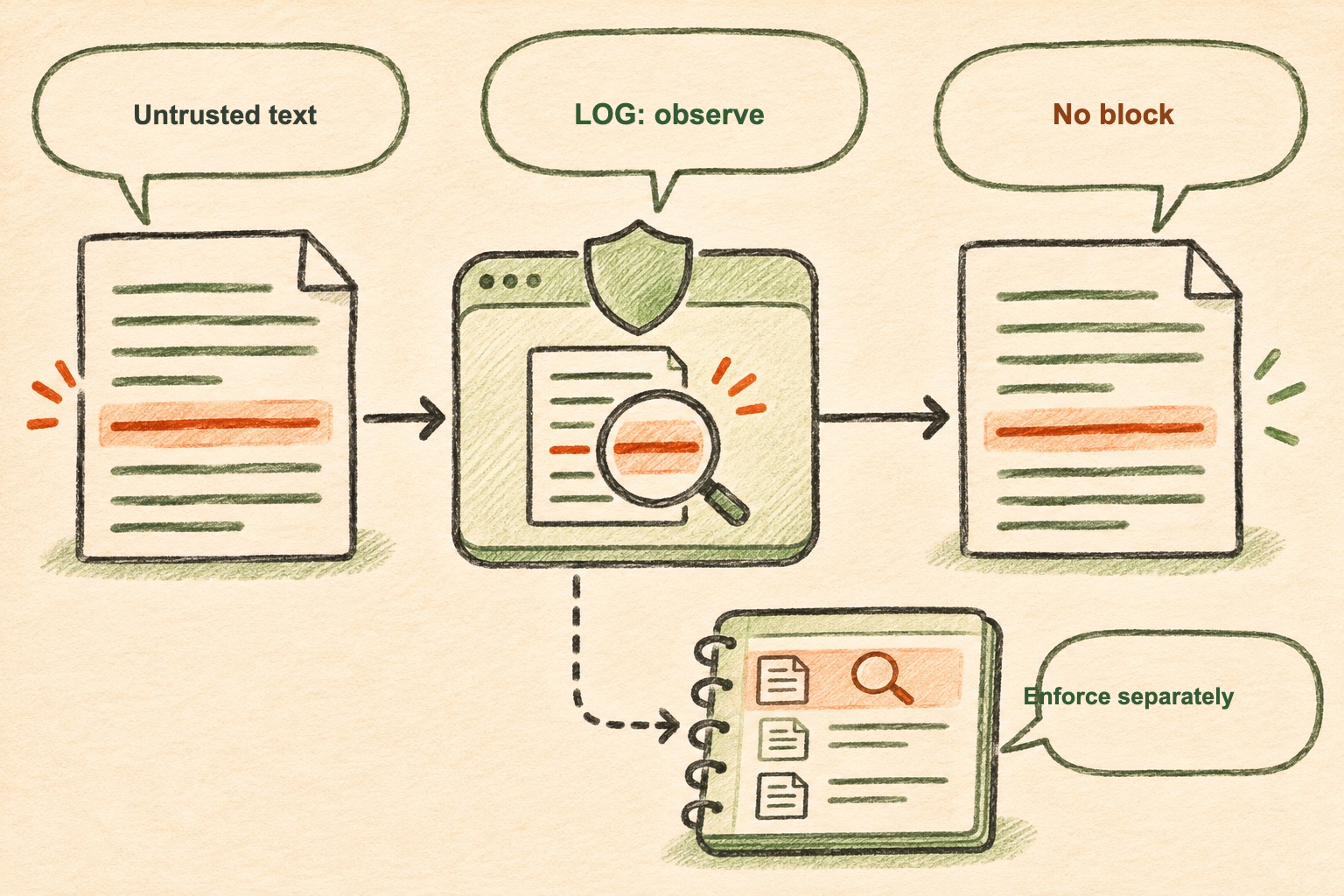
Snowflake says log-mode detections appear in CORTEX_AI_GUARDRAILS_USAGE_HISTORY and apply to CoCo, Snowflake CoWork and Cortex Agents. The setting lives in the AI_SETTINGS account parameter. These are vendor-documented scope and mechanics; the release note does not provide a detection-rate benchmark or say that every prompt-injection pattern will be identified.
Why observe before enforcing?
Teams often discover a guardrail’s value only after enabling it: false positives block ordinary instructions, while missed attacks create false confidence. A log-only window lets a team compare detection events with the actual request and the resulting action. Reviewers can classify detections as likely attacks, benign quoted content, or uncertain cases, then tune policy and escalation paths before enforcement.
The useful unit of analysis is not just the flagged text. Record which source supplied it, which agent and tools were active, what data was reachable, whether the user approved the action, and what happened next. A log entry that cannot be tied to a specific run is hard to turn into a security decision. Teams should also define retention and access rules for the resulting history because the records can contain sensitive prompts or business context.
Log mode does not contain the attack
In LOG, a suspected injection does not change the response. If untrusted retrieved text tells an agent to expose a file, and the tool is authorized to read that file, logging the instruction does not stop the read. Keep permissions, input validation and confirmation gates outside the model. This is the same boundary emphasized in our prompt-injection permissions explainer: a model classifier can inform a decision, but it cannot replace the system that enforces access.
This is also why “false positive rate” alone is not an adequate rollout metric. Measure what is blocked, what is allowed, how often a human must intervene, and whether a blocked request can safely resume. A conservative mode may be appropriate for high-risk actions even when a lower-risk summarization path uses observation to gather baseline evidence.
A practical rollout sequence
Start with one representative agent and a short, documented observation period. Compare logged detections against sampled runs and known attack tests. Note the effect on normal tasks, identify which event fields are available, and confirm who can inspect the history. Then decide where BLOCK belongs and which actions still require explicit approval or deterministic policy checks. Keep a rollback plan for workflows that depend on legitimate quoted or retrieved instructions.
The new option creates a useful deployment bridge between “turn the guardrail on everywhere” and “do not measure it.” Its safe interpretation is precise: LOG helps teams learn how detections behave; BLOCK is the mode that acts on them. Neither guarantees that every injection is caught or every legitimate request passes.
Conceptual AI-generated illustration; the marked instruction is illustrative, not a captured Snowflake interface.
Frequently asked questions
What does LOG mode do for Snowflake prompt-injection guardrails?
Snowflake says LOG mode scans and records possible prompt injections in supported Cortex experiences without changing responses; BLOCK remains the default behavior that acts on detections.
Should a team leave prompt-injection guardrails in log mode?
Log mode is useful for evaluating detections before enforcement, but it does not stop a detected attack. Teams should retain separate authorization controls and move to blocking only after measuring operational impact.
Sources & further reading
Keep reading
AI Agent Transparency Needs Evidence Outside the Agent's Own Story
Microsoft's new initiative highlights an operational rule for agent oversight: reconstruct identity, authority and actions from independent records.

Persistent AI Agents Need a Trusted Control Plane and a Small Work Box
OpenAI's OpenClaw deployment shows why persistent agents need separate control services, sandboxed work, brokered secrets and auditable identity.

IBM’s LLMON Tries to Put a Boundary Between Instructions and Data
LLMON structures model context and reports lower indirect-injection success in selected tests. It is promising, but not a security boundary.
/* Comments */
Comments are offline right now — we reconnect automatically, nothing is lost.